A meal photo can make journaling faster, but the most useful result is a thoughtful starting point—not a number you have to accept.
Cute food diary apps compared: stickers, pets, photos, or no numbers
A food diary you like opening is one you keep. Start with what you want to see at the end of the day: stickers, a pet, a photo gallery, or numbers.
- Written by
- bling editorial team
- Product review
- bling product team
- Published
- Last reviewed
Start with what you want to keep
Cute food diaries differ less in style than in what they leave you with at the end of the day. Some turn each meal into a sticker and estimate its calories, one grows a character as you log, and some keep only photos and skip numbers entirely.
Meal stickers with calorie estimates
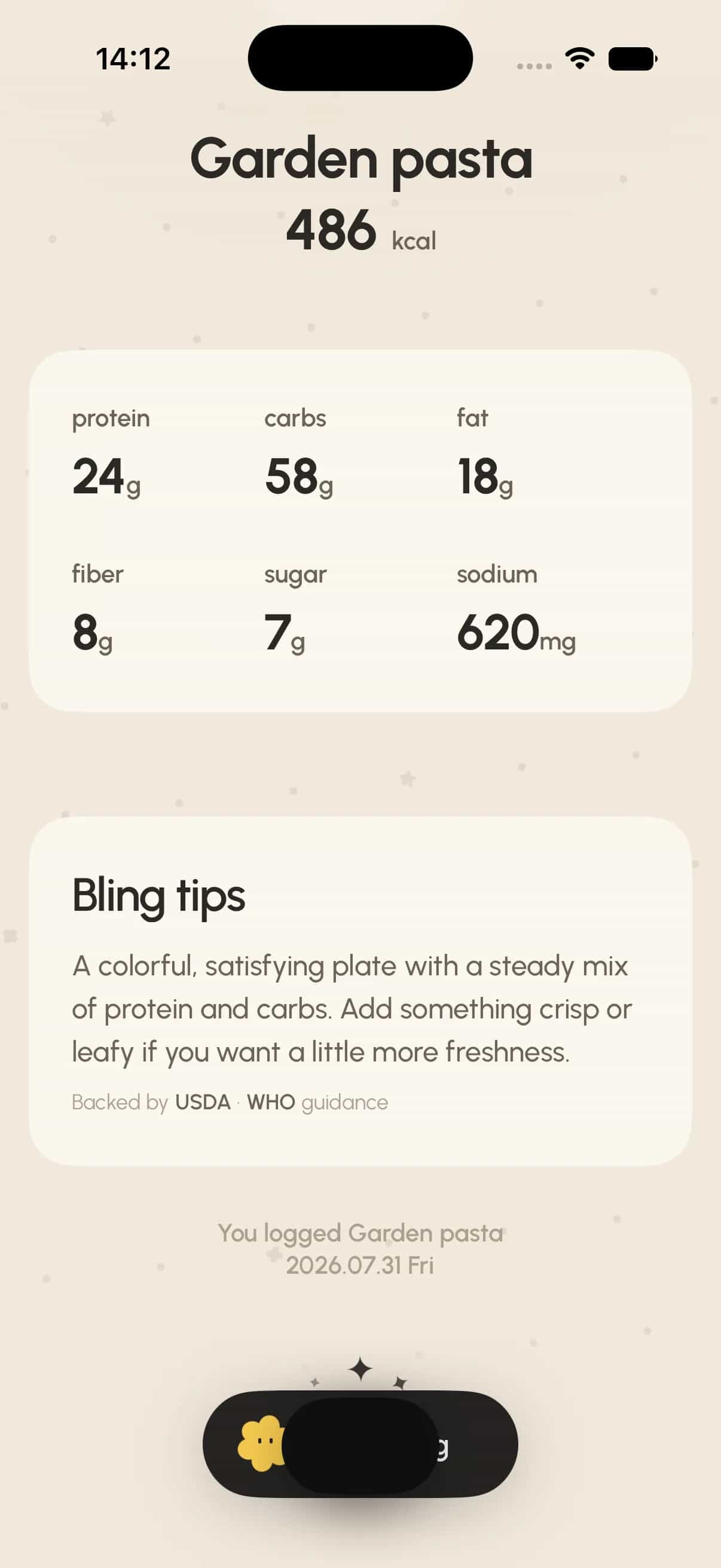
Bling, Eatmoji, and Noms each turn a meal photo into a sticker and estimate its nutrition. They differ in platforms, in how much nutrition detail they show, and in what the free tier covers. [1], [5], [9]
A character that grows as you log
Capy Diet pairs a calorie counter with a capybara virtual pet that grows, with clothes, furniture, and mini-games to unlock. [3]
Six cute food diaries, compared
Apps are listed alphabetically. Details come from each app’s official store listings and website on September 29, 2026. We did not run a hands-on test or compare the accuracy of their estimates.
Swipe sideways to see every column
| App | What you keep | Calorie numbers | Main input | Platforms | US price model |
|---|---|---|---|---|---|
| Bling | Die-cut meal stickers and a daily FOOD TICKET recap | Yes, an editable estimate | Meal photo (snap or upload) | iPhone; Android | Free download; Bling Pro $4.99/week or $39.99/year |
| Capy Diet | A capybara pet with outfits and furniture | Yes: calories, macros, BMI | Food database or AI scanner | iPhone; iPad; Android | Free with in-app purchases; App Store says logging needs a subscription |
| Eatmoji | Collectible meal stickers | Yes: calories plus 23+ nutrients | AI photo recognition or food search | iPhone | Free tier; Pro $6.99/month or $29.99/year |
| FoodView | A photo gallery by day, week, or month | No | Photo with optional notes | iPhone; iPad; Android | Free; no in-app purchases listed |
| Noms | A sticker scrapbook, Physics Box, and recap videos | Yes: calories and macros | Photo turned into a sticker | iPhone; Android | Free with in-app purchases; $9.99/month, $29.99/year, or $49.99 lifetime |
| See How You Eat | A daily photo collage | No | Photo in two taps | iPhone; Apple Watch; Android | Subscription after a 7-day free trial |
What each app actually offers
These notes follow each app’s own listing. They describe product fit, not a ranking.
Bling: stickers with an estimate you can edit
Bling is our product. Snap or upload a meal, review and edit the AI calorie and macro estimate, then keep it as a die-cut sticker; FOOD TICKET turns the day into a receipt-style recap you can save or share. [1]
Bling is free to download, and using the journal requires Bling Pro, listed at $4.99 per week or $39.99 per year on the US App Store (checked September 29, 2026). [2]
Choose it when you want the meal photo itself to become the keepsake and still see numbers you can correct.
Capy Diet: a pet that grows as you log
Capy Diet logs food through a database powered by FatSecret and an AI scanner, and tracks calories, macros, and BMI alongside its capybara pet. [3], [4]
Its App Store listing says food logging requires a subscription, and its age rating notes loot boxes. [3]
Eatmoji: collectible stickers and detailed nutrients
Eatmoji turns every meal into a collectible sticker and estimates calories plus 23 or more nutrients from a photo. Its listing says unlimited AI scans and full AI reports are Pro features, at $6.99 per month or $29.99 per year on the US App Store. [5]
It is listed for iPhone; we could not confirm a current Android listing.
FoodView: a photo gallery with no numbers
FoodView keeps meal photos, with optional notes, in a gallery by day, week, or month. By design it has no calorie tracking, barcode scanning, or manual data entry, and its App Store listing shows no in-app purchases. [6], [7], [8]
Noms: a sticker scrapbook that moves
Noms cuts a meal photo into a sticker with on-device background removal and estimates calories, carbs, protein, and fat. Stickers collect in a scrapbook and a Physics Box where they bounce when you shake the phone. [9]
On the US App Store it offers $9.99 monthly, $29.99 yearly, and $49.99 lifetime purchases; its Android listing says unlimited AI scans are part of PRO. [9], [10]
Do you need calorie numbers at all?
Numbers help when you are working toward a specific calorie or protein target. A photo diary without numbers can be enough when the goal is noticing patterns: when you eat, what you reach for, and how meals feel.
If you do use photo estimates, treat them as drafts. In a preliminary NIH study presented in July 2026, the photo features of four calorie-tracking apps underestimated 102 carefully prepared meals by about a third on average. [14]
Questions worth answering
What is a cute calorie tracker app?
A calorie tracker with a playful visual layer, such as stickers, characters, or a scrapbook. In this comparison, Bling, Eatmoji, and Noms turn meal photos into stickers with calorie estimates, and Capy Diet adds a capybara pet.
Is there a food diary app that turns meals into stickers?
Yes. Bling, Eatmoji, and Noms each turn a meal photo into a sticker. Bling and Noms have iPhone and Android listings; Eatmoji is listed for iPhone.
Which cute food diary apps work on Android?
Bling, Capy Diet, FoodView, Noms, and See How You Eat have current Google Play listings. We could not confirm a current Android listing for Eatmoji.
Are cute food diary apps free?
FoodView lists no in-app purchases. Bling requires a Bling Pro subscription, See How You Eat requires Premium after a 7-day trial, Capy Diet’s App Store listing says logging needs a subscription, and Eatmoji and Noms are free to start with paid upgrades.
Can I keep a food diary without counting calories?
Yes. See How You Eat and FoodView keep meal photos without calorie numbers, which can be enough when the goal is noticing patterns rather than hitting a target.
Editorial note
This comparison is general product information, not medical advice or an accuracy ranking. If tracking food makes eating feel harder, or you have a history of disordered eating, talk with a qualified healthcare professional before using a calorie tracker.
Source ledger
Sources and further reading
- Bling product workflowBling
- Bling: Cute Calorie TrackerApple App Store
- Capy Diet: Fun Calorie CounterApple App Store
- Capy Diet: Fun Calorie TrackerGoogle Play
- Eatmoji: Cute Calorie TrackerApple App Store
- FoodView - Photo Food DiaryApple App Store
- FoodViewFoodView
- FoodView: Easy food diaryGoogle Play
- Noms - Daily Food Diary & LogApple App Store
- NomsGoogle Play
- Food Diary See How You Eat LogApple App Store
- See How You EatGoogle Play
- See How You EatSee How You Eat
- Photo-based calorie-tracking apps may underestimate energy in mealsAmerican Society for Nutrition via EurekAlert!
See something that needs correction? Read our editorial policy or email team@bling.best.